HomeMapper
Your entire smart home network. One view.
Scan HomeKit, Home Assistant, Thread, Matter, IP, and more. Every device, every detail.

iPhone · iPad · Mac
The more devices you add, the less you see.
You added the plug. It worked. Six months later, something on the network stops responding, and you have no idea which device, or why. Apple's Home app shows you rooms and toggles. It doesn't tell you which protocol each device uses, what firmware it's running, whether it's actually reachable, or what role each device plays on your network. More devices, less visibility.
Apple Home controls. HomeMapper inventories.
Apple Home is for turning lights on, locking doors, running scenes. HomeMapper is for knowing what's on your network: which devices speak Matter, the Thread mesh role where reported, each IP accessory's address and ping responsiveness, the firmware it's running, whether it's reachable. It's also where you keep the setup codes Apple Home uses to pair a device, then never shows you again. Different jobs. HomeMapper doesn't replace Apple Home. It shows you the layer underneath.
Every way your devices show up, in one view.
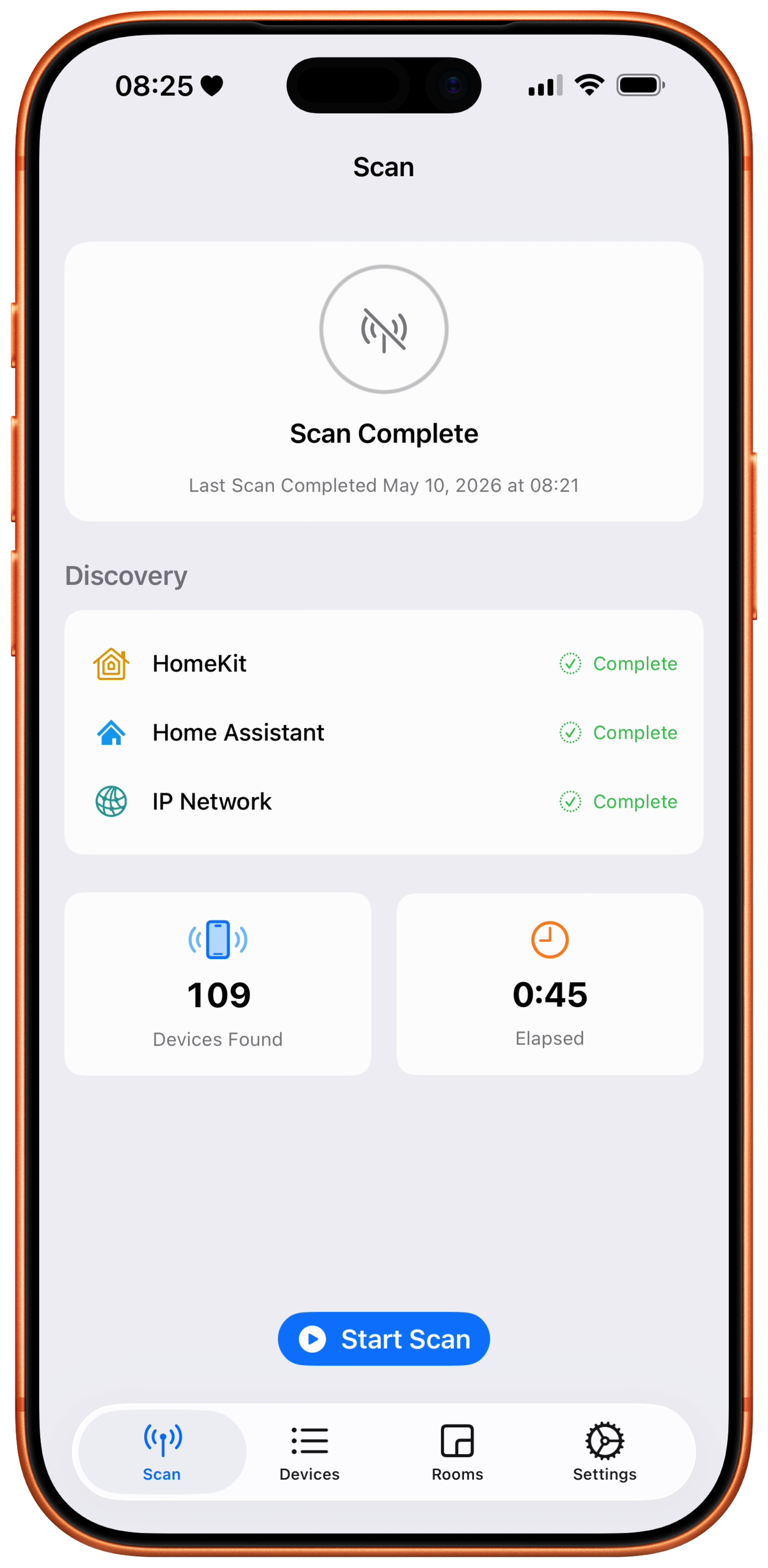
HomeMapper runs every discovery method a device might announce itself on, concurrently:
- Apple's ecosystem. HomeKit via Apple's framework. Thread accessories through HomeKit, plus Border Routers that announce themselves on the network. Matter detected during the HomeKit scan.
- The network itself. Bonjour service discovery, subnet scans, and the other ways devices announce themselves on your local network (including older protocols like SSDP/UPnP that many routers and smart TVs use).
- Home Assistant. Direct read of your Home Assistant device registry, including Matter, Thread, Zigbee, Z-Wave, ESPHome, and MQTT devices.
When the same device shows up through multiple methods, HomeMapper merges the records using definitive hardware identifiers, not names. No fuzzy name matching. If two records can't be confidently merged, HomeMapper shows them as duplicates rather than risk collapsing two different devices into one.
Scan-only by design. HomeMapper discovers and inventories. It never controls, modifies, or commissions. A deliberate boundary, not a limitation.
HomeKit scanning is free. Some discovery methods and correlation features are Pro.
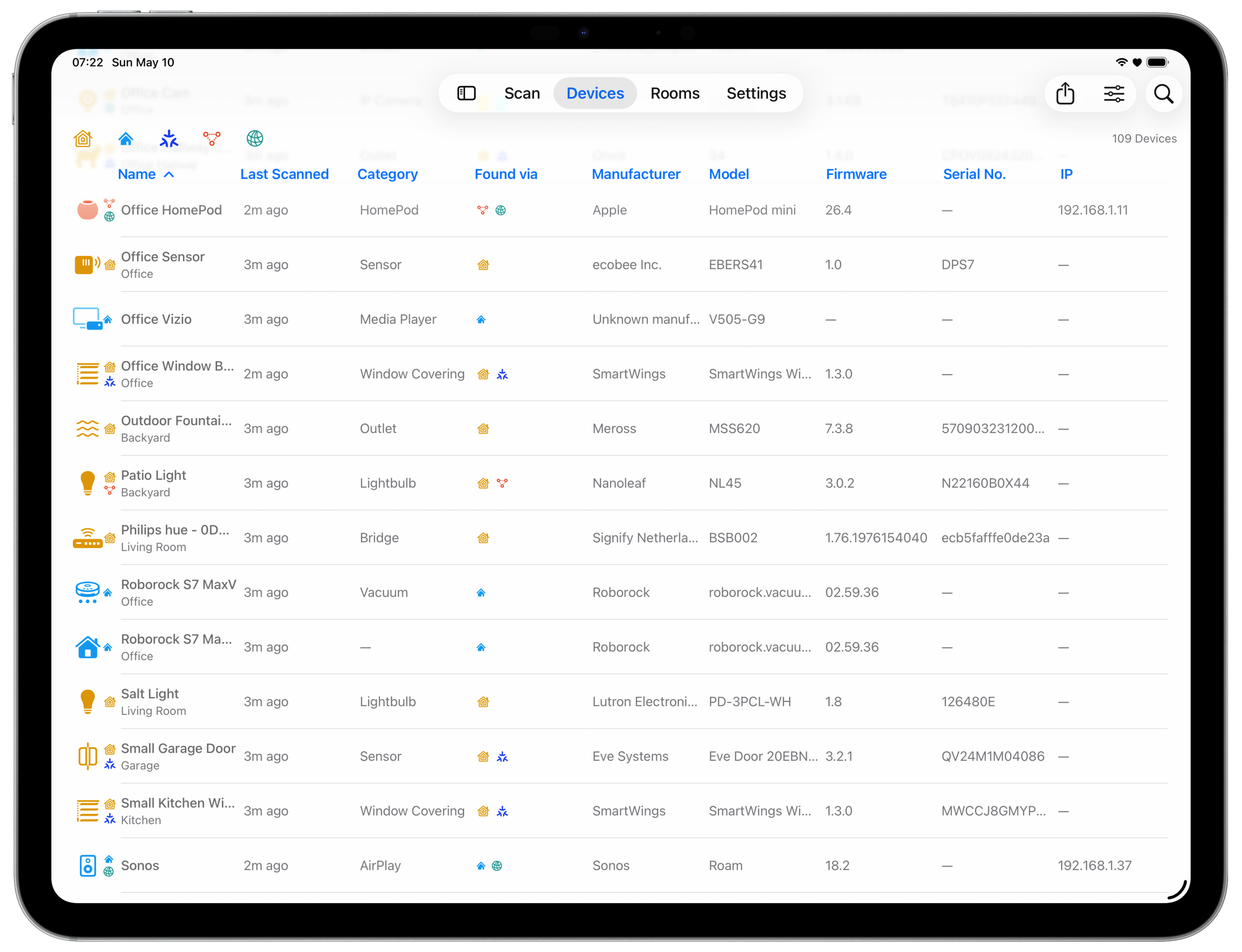
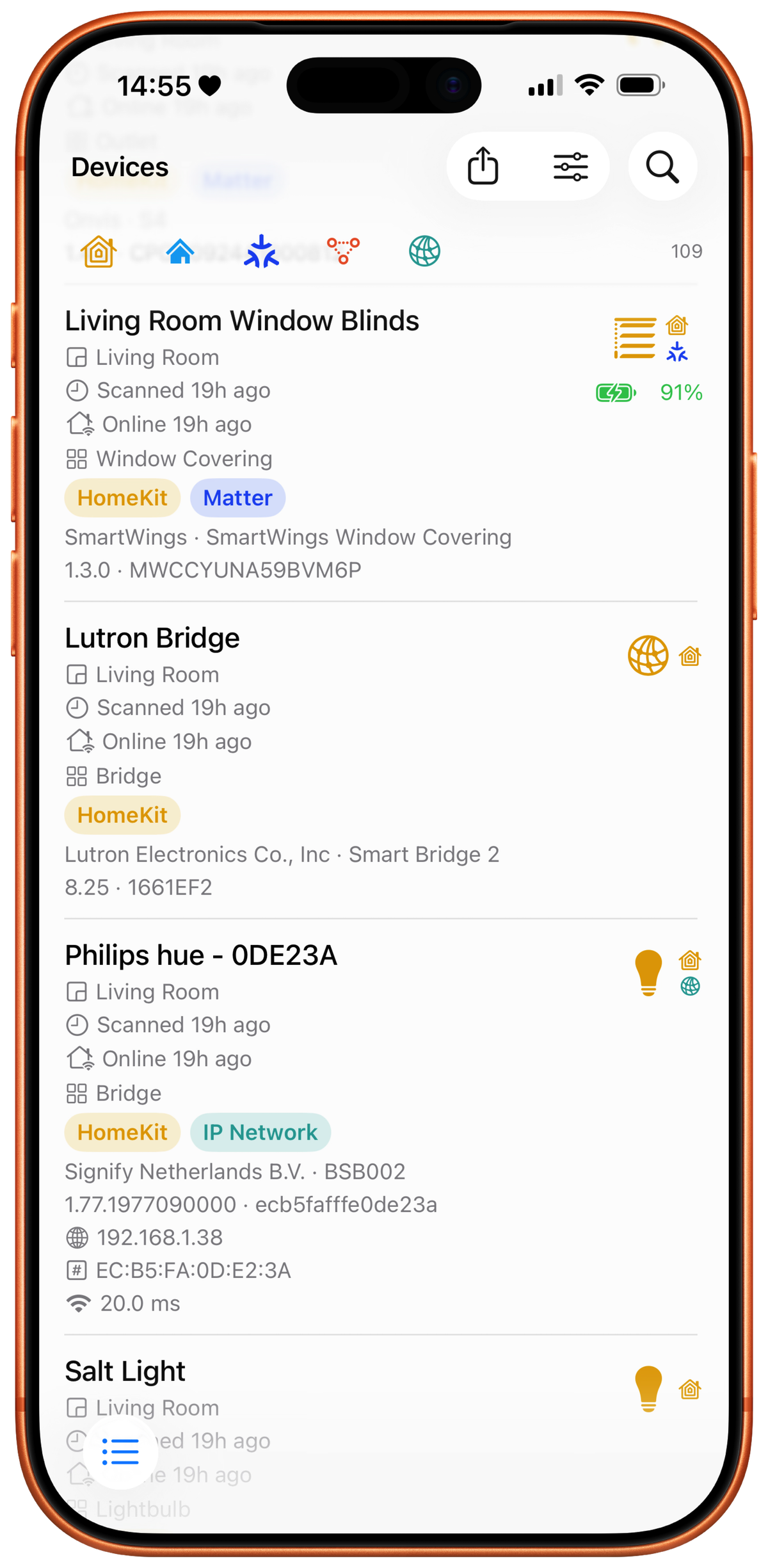
Your devices, every detail.
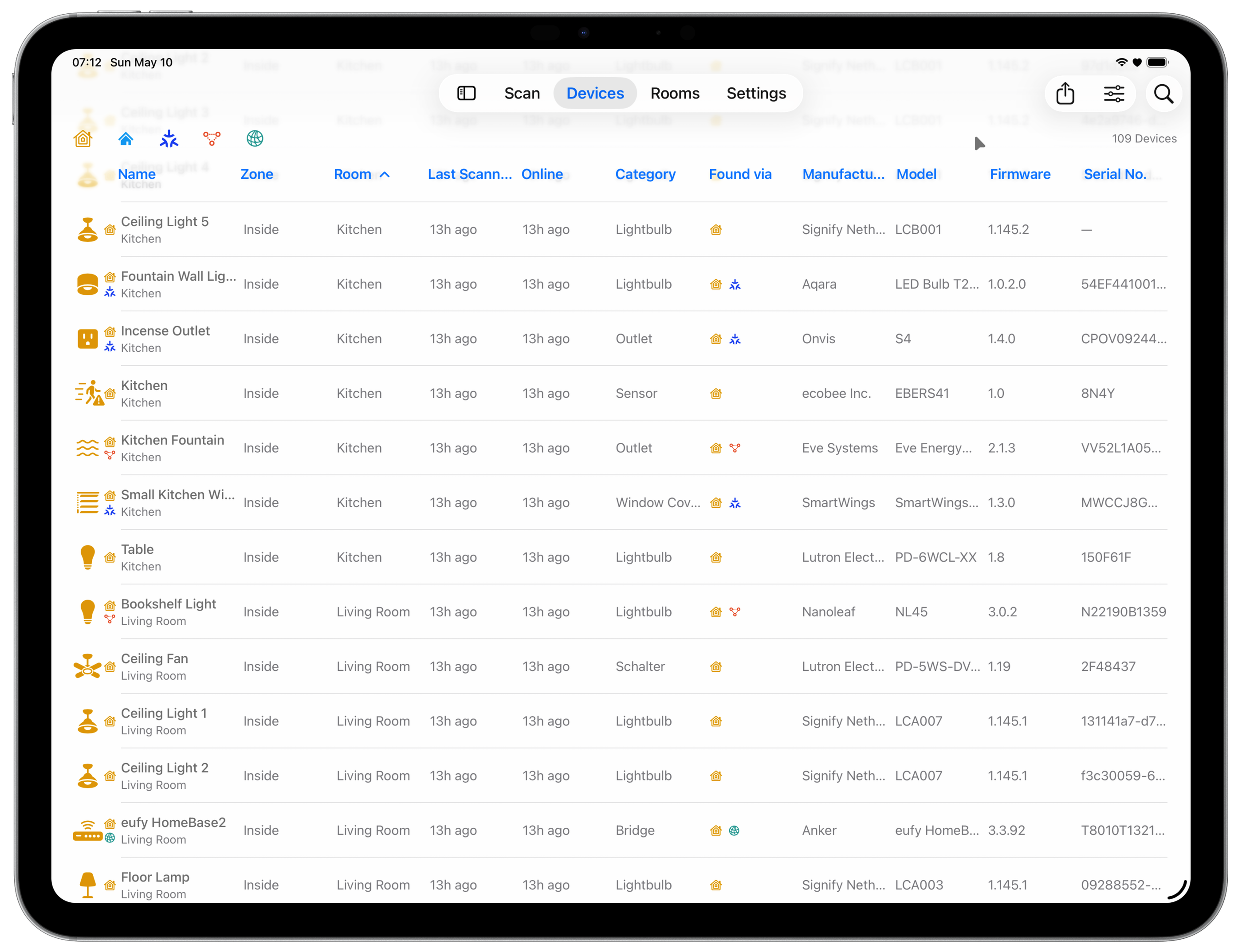
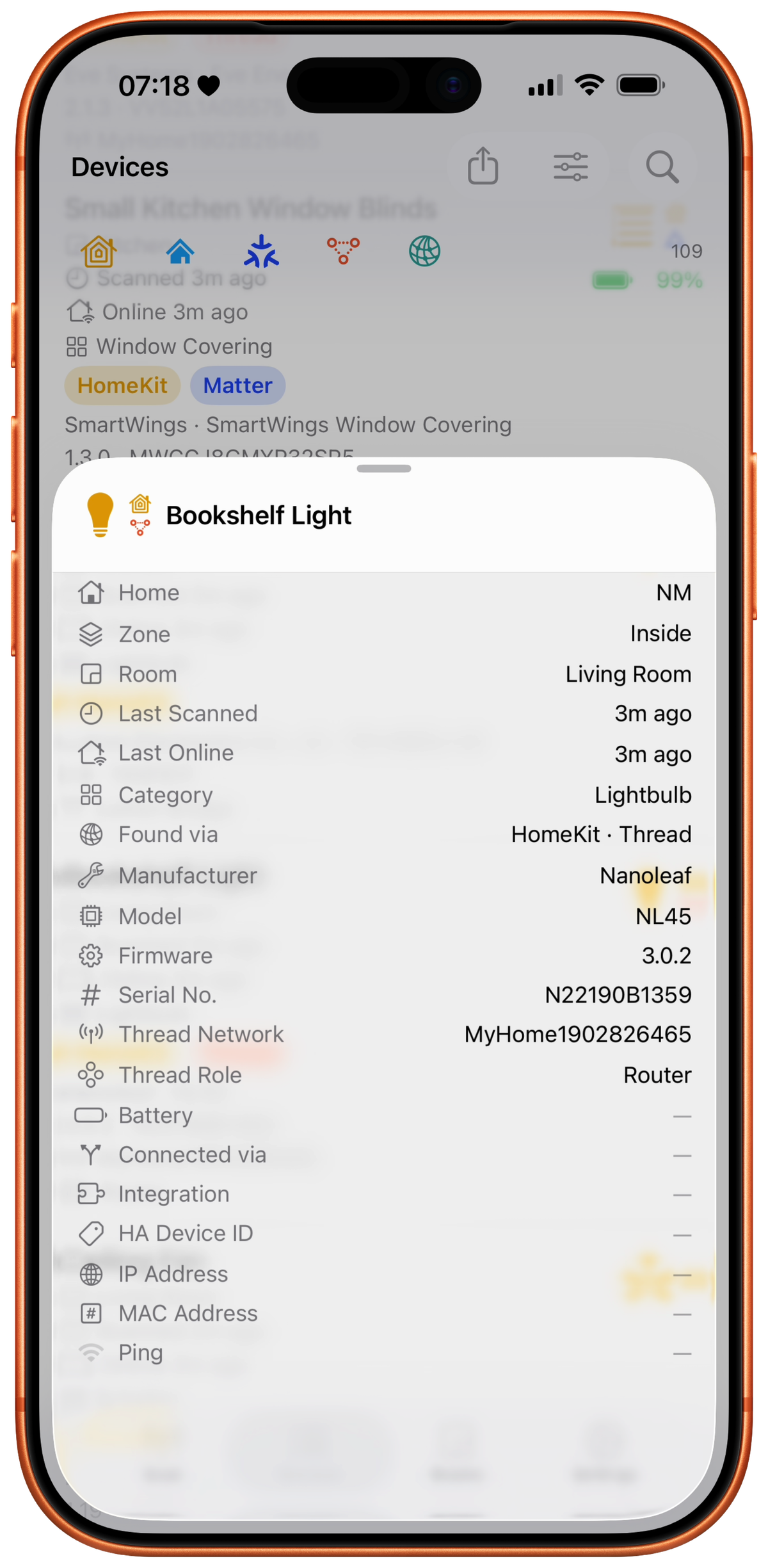
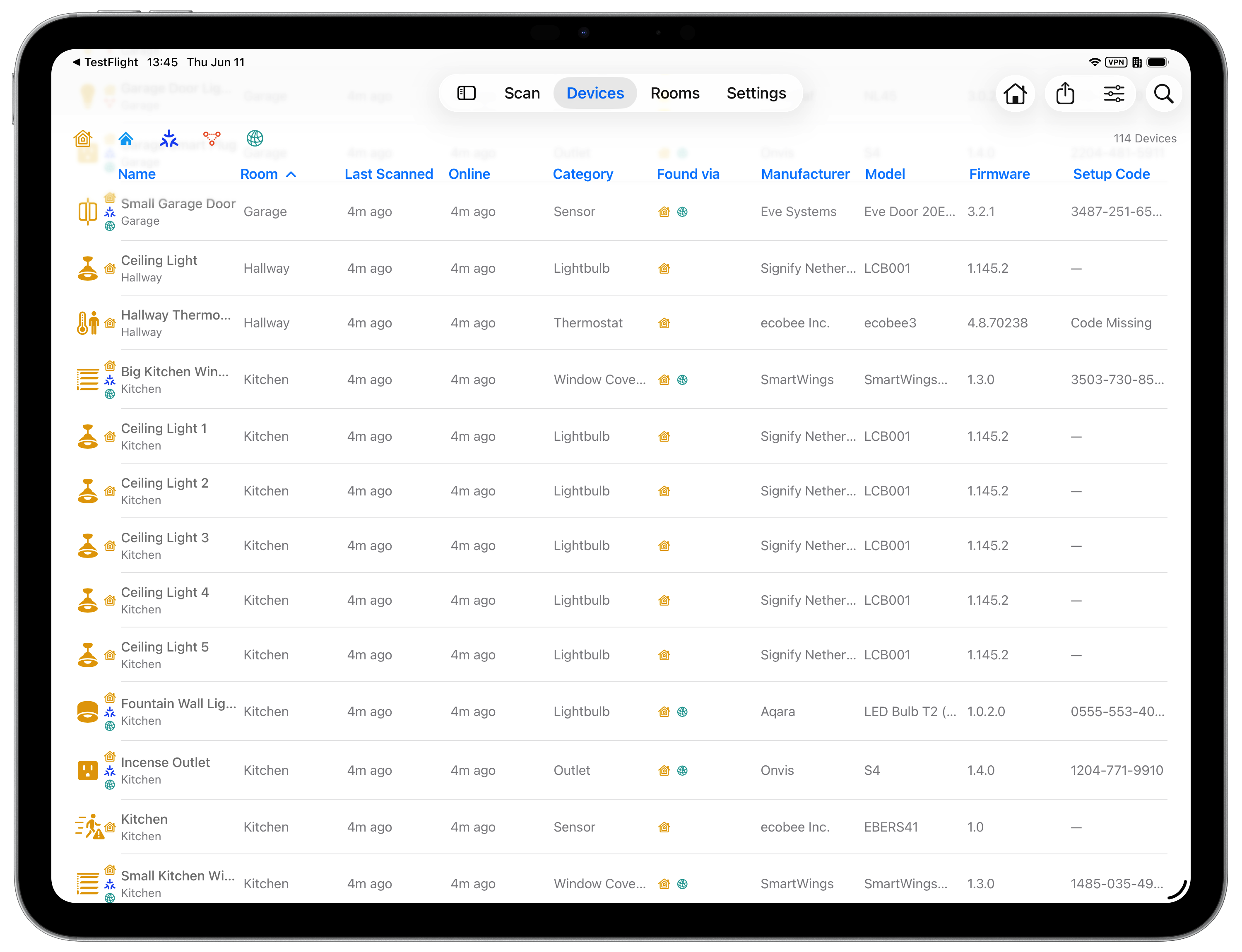
See devices Apple's Home app can't (IP, Home Assistant, and most things announcing on your network) and the details it tucks away (manufacturer, model, firmware, serial number, battery, Matter and Thread info). Sort, search, and customize the columns to match how you work.
On iPad and Mac, devices appear as a table that fits as many columns as your screen has room for. On iPhone, they appear as rich detail cards. Same data, adapted to the screen.
Room-based view groups devices by room with reachability status and protocol badges, an alternative way to see the same data.
Sort and filter by any column; search by name, room, manufacturer, or model.
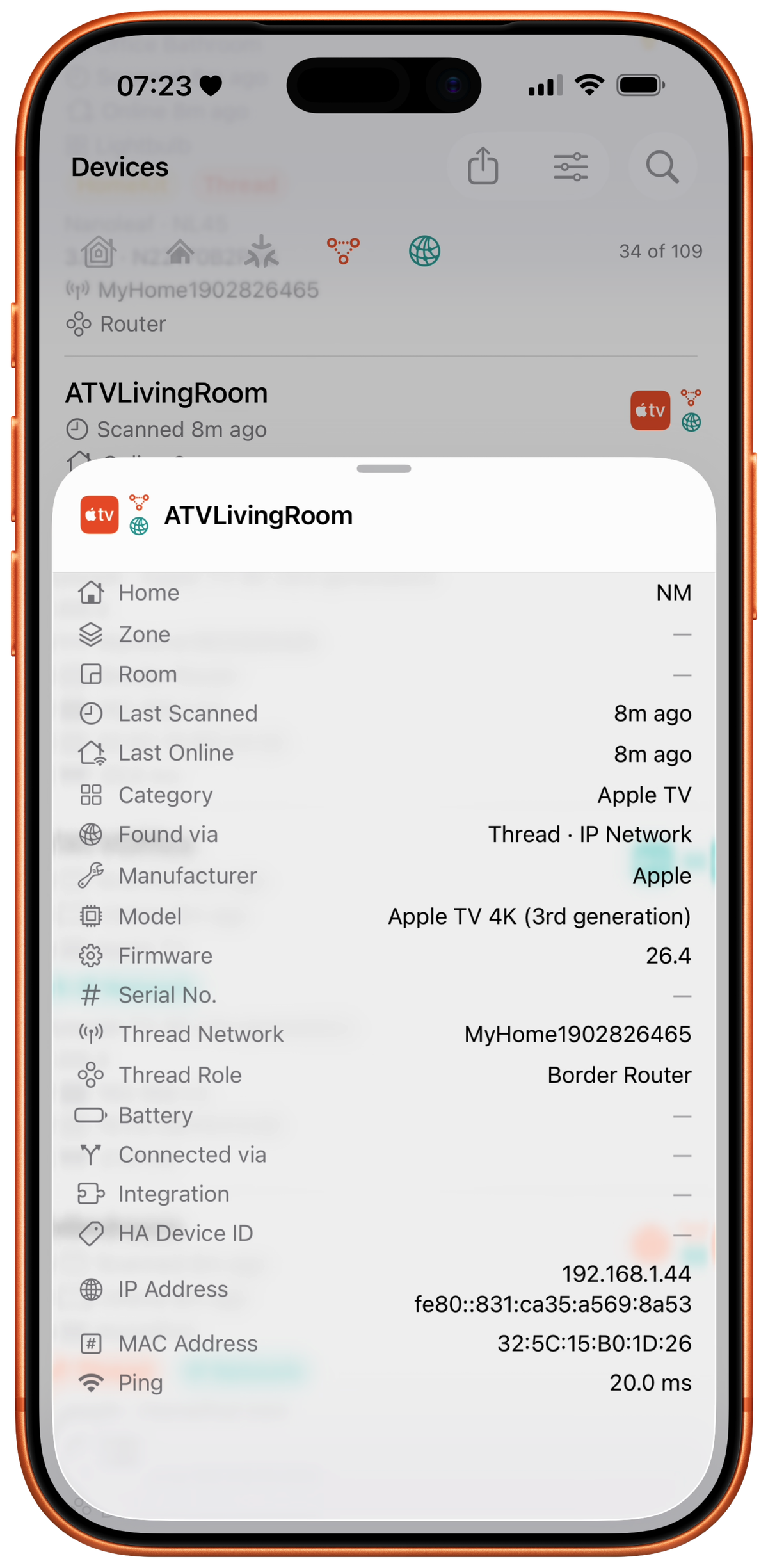
All the details a device will share.
HomeMapper doesn't just list your devices. It enriches each one with as much data as the protocols will share.
Thread role where reported, network name, IP address, MAC address, ping responsiveness, firmware version, serial number, battery level, reachability status, bridge relationships, and more. Pulled from all available sources, merged into one device record.
Not all devices reveal all details. Visibility depends on what each protocol exposes. HomeMapper shows you everything that's available.
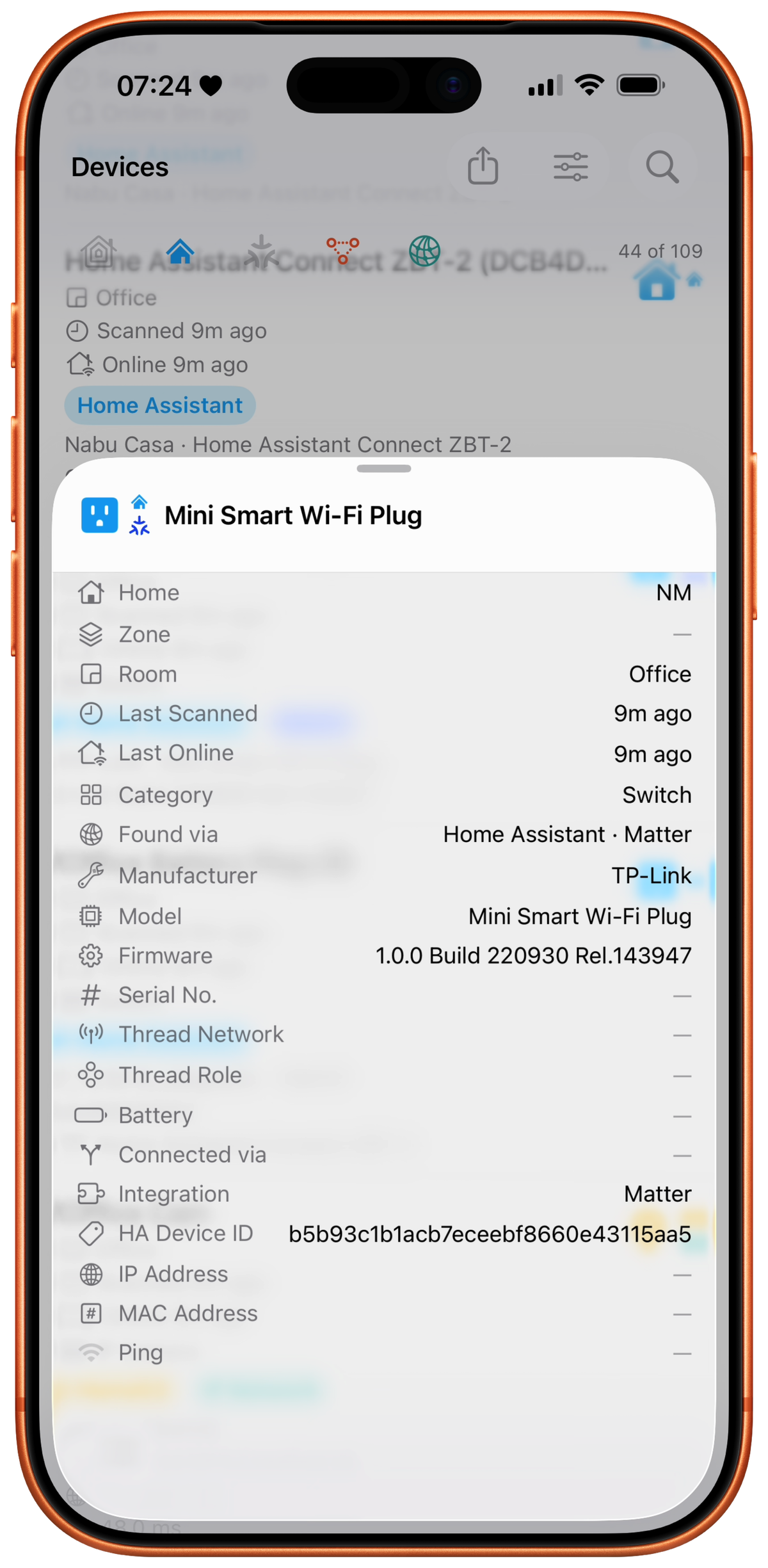
Home Assistant, first class.
HomeMapper scans your Home Assistant instance with the same depth it scans HomeKit. Devices from both platforms flow into one unified inventory, correlated by hardware identifiers.
Zigbee, Z-Wave, ESPHome, MQTT: devices HomeKit can't see become visible alongside the ones it can. One scan. One inventory. Both platforms.
Choose your Primary Platform (HomeKit or Home Assistant) and HomeMapper favors its rooms, names, and ordering when a device is known to both.
Home Assistant integration is a Pro feature. Included in the 7-day Pro trial, cancel anytime.
Save your setup codes while you still have them.
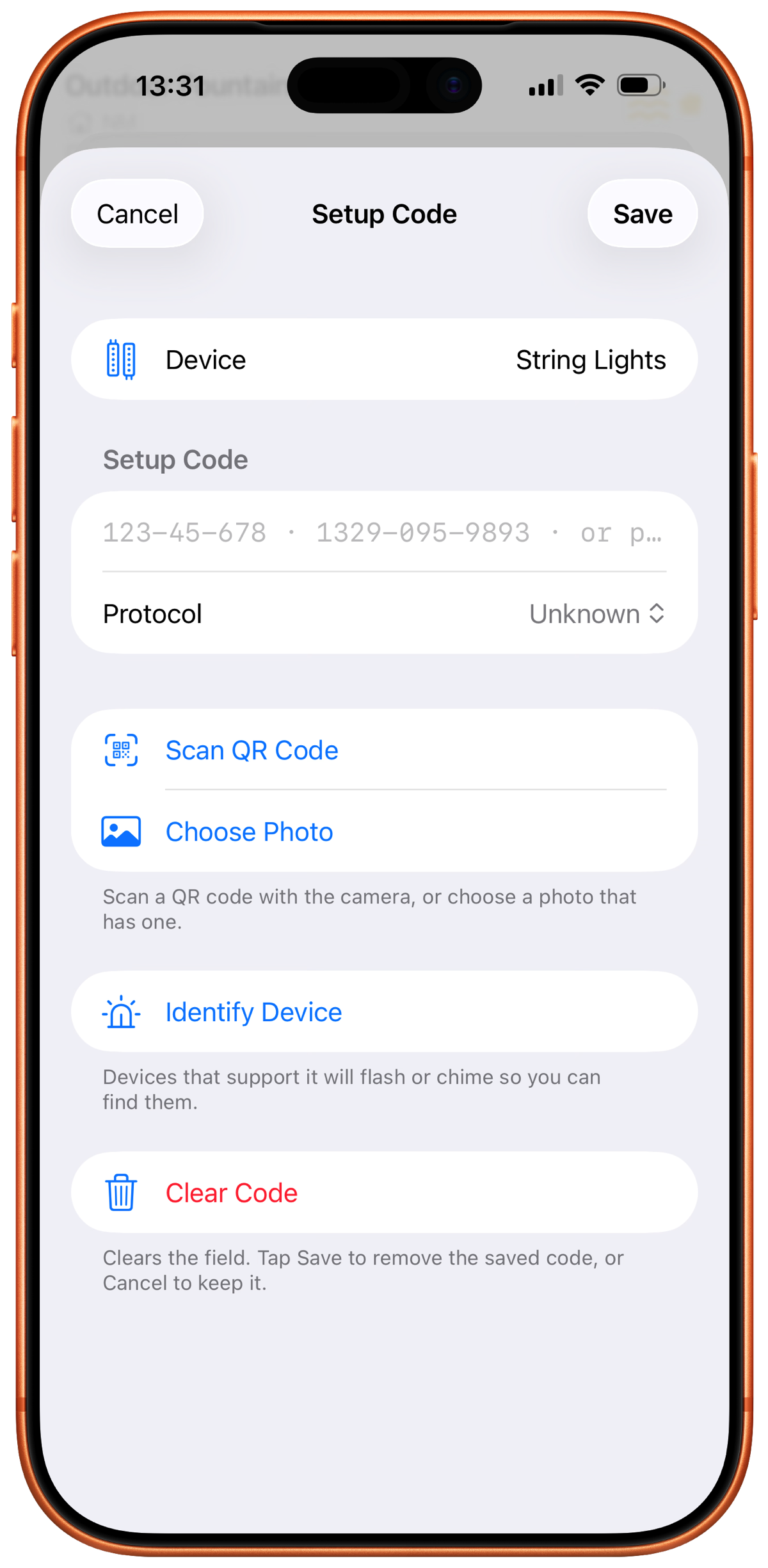
Every HomeKit, Matter, and Z-Wave device has a setup code: a number or QR on the device or its box. You need it to pair the device, and again if you ever reset it or move it to a new home. Wherever it's printed, labels fade and wear off, especially outdoors. Once it's gone, so is the code. No scan can recover one, because setup codes never travel over the network.
HomeMapper keeps each code with its device. All your codes, HomeKit and Home Assistant, in one place. Type it in, scan the QR sticker, or pick a photo that has the QR in it. For older HomeKit accessories that print an 8-digit number instead of a QR, HomeMapper reads the printed digits too, by camera or from a photo. A room-by-room list shows every device that can hold a code but doesn't have one yet, so you can work through the house once.
Lots of devices? Export a CSV worksheet, fill in the blanks in a spreadsheet, and import it back. The same file imports on your other devices too.
Your codes are yours: saved on your device, included in your backups, exportable as CSV. With iCloud Sync on, they also sync across your devices through your own iCloud, never a server of ours. Setup code saving is a Pro feature, included in the 7-day trial.
Export everything.
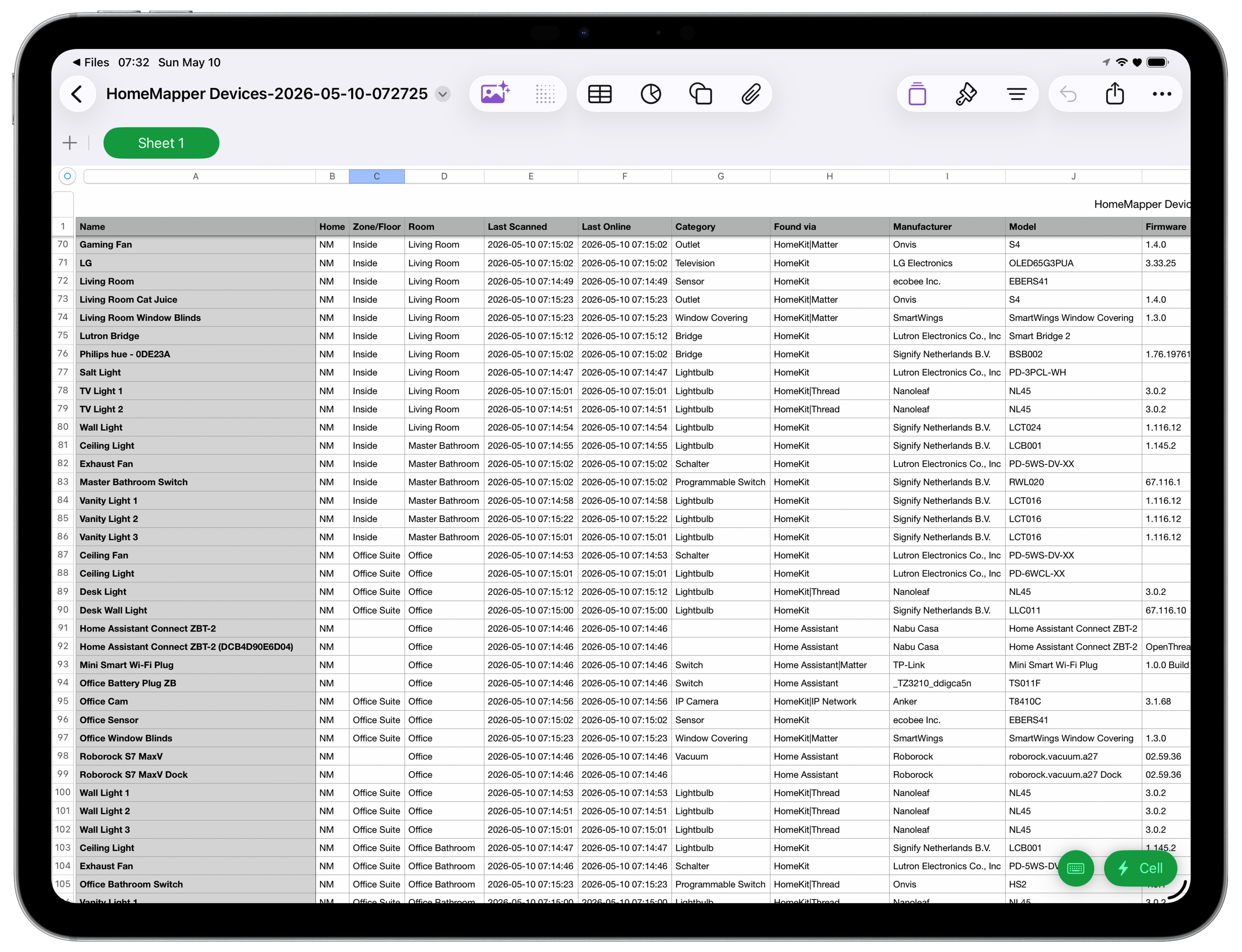
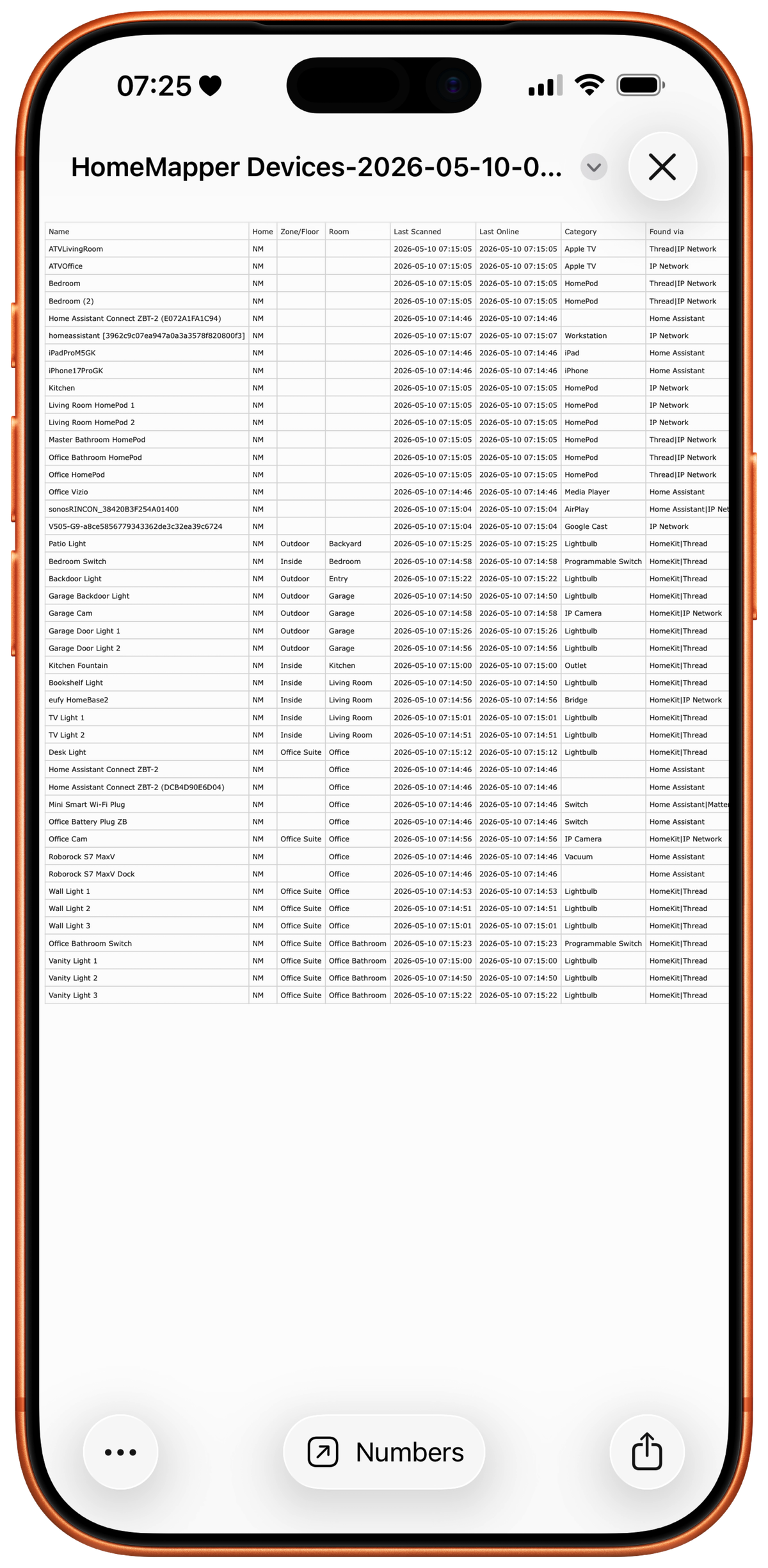
Export your entire device inventory to CSV. All columns, all devices, filtered exactly how you want.
Use it for insurance documentation, network planning, troubleshooting, or just having a record of what you've built.
Your data lands in a tool you already use: Numbers, Excel, or Google Sheets. Column headers, device data, ready to work with.
Export is your action, not ours. Nothing leaves your device unless you send it.
Your data. Your control.
- You are not the product. Zero ads, zero tracking. Privacy first, forever.
- Your scan results stay on your device. What syncs across devices, like room order and saved setup codes, uses your own iCloud, never a server of ours.
- No account required. The only login is directly to Home Assistant, and only if you choose to connect it.
- Export is your action, not ours.
Free forever. Pro when you're ready.
Free
$0
Forever
- HomeKit scanning
- Device list with core columns
- Room-based view
- Switch between Apple Homes (one at a time)
- No scan limits
- No time limits
Pro
$9.99/year Regular price $19.99.
Launch pricing
7-day free trial
- Everything in Free
- All 20+ data columns
- Multi-protocol scanning
- Protocol filtering
- Combined “All Homes” view
- Home Assistant integration
- CSV export
- Backup and restore
- Setup code saving
All Pro features are included in the 7-day free trial. Cancel anytime.
Download free. Try Pro for 7 days.
iPhone · iPad · Mac
Questions, answered.
What's included in the 7-day Pro trial?
Everything in Pro: all data columns, multi-protocol scanning, protocol filtering, combined “All Homes” view, Home Assistant integration, CSV export, backup and restore, and setup code saving. The trial starts when you opt in. You can cancel any time during the 7 days through your App Store subscriptions.
Why is Pro a subscription?
You are not the product. No ads, no trackers, no selling your data. Your scan results stay on your device, and they stay yours. Paying for Pro is how we keep it that way.
Pro funds the work: keeping up with each iOS, macOS, HomeKit, Matter, Thread, and Home Assistant release, fixing bugs, and building the next things on our roadmap.
The Free tier covers HomeKit scanning, the device list, and the room-based view. Pro is for people who want the full picture across protocols and who want to back what we're building.
How do I cancel Pro?
Through the App Store, like any Apple subscription: Settings › [your name] › Subscriptions › HomeMapper. Cancel any time; you keep Pro features until the end of the current billing period.
Does any of my data leave my network?
Your scan results are never sent automatically. They live in a local database on your device. HomeMapper has no analytics SDK, no tracking, and no cloud relay. When you connect Home Assistant, HomeMapper talks directly to your instance on your local network. Some of your setup (room order, Home Assistant connections, and saved setup codes) syncs across your devices through your own iCloud, never a HomeMapper server.
Your scan data leaves your device only when you send it, and only in two ways:
- CSV export. You choose when, what to include, and where it goes.
- Send Logs from Settings. Optional, for support. Logs include device names and scan details. They never include passwords, HomeKit credentials, or network keys.
Do I need Home Assistant to use HomeMapper?
No. HomeMapper works on its own. HomeKit scanning, the device list, and room-based view are all available on the Free tier without Home Assistant. If you do run Home Assistant, Pro unlocks a unified inventory across both platforms.
Can HomeMapper control my devices?
No. HomeMapper discovers and inventories. It never turns things on, changes settings, or commissions devices. Scan-only is a design principle, not a missing feature.
Does HomeMapper run on Android or Windows?
HomeMapper is an Apple-platform app: iPhone, iPad, and Mac. HomeKit's framework is Apple-only, and that's where HomeMapper starts. We have no Android or Windows version planned.
Built by home automation power users, for home automation power users.